
How the Timeline tab in Energy SOAR organizes the SOC team’s work and makes incident response auditing easier
Handling a security incident is usually work done by multiple people spread out over time: an analyst opens a case, someone else adds observables, a supervisor changes the priority, and finally the case gets closed with the appropriate classification (e.g., True Positive / False Positive). The problem arises when you need to reconstruct that sequence – who did what, when, and why. In Energy SOAR, this is solved by the Timeline tab, available directly on the case object.
What is the Timeline tab?
Timeline is a chronological record of all actions performed within a given case (an audit log). Instead of manually searching through comments, change history, or asking the team “what actually happened with this ticket,” an analyst opens a single tab and sees an organized, readable timeline – from the case’s creation all the way to its closure.
What exactly does Timeline show?
For each entry on the timeline, the system presents complete information:
- who performed the given action,
- exactly when the action was performed,
- what the change concerned,
- what type of operation was performed – e.g., creation, update, deletion,
- which elements of the case were changed,
- how the incident handling actually unfolded over time.
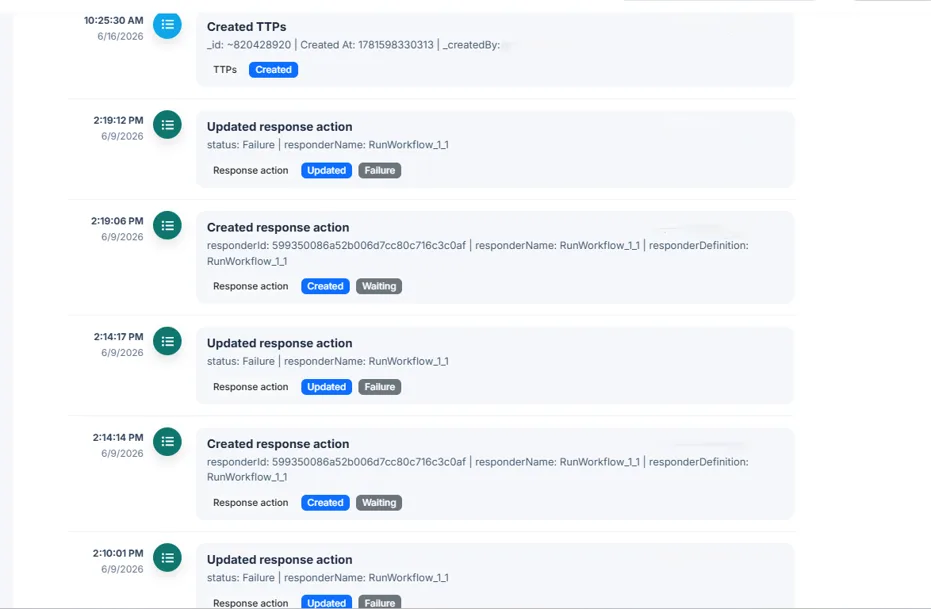
The Timeline tab in the case view – full action history along with the incident details panel (Energy SOAR)
Why does this matter for the SOC?
A security team’s work rarely proceeds in a straight line, and it’s rarely handled by just one person. Cases get escalated, handed off between shifts, and sent back for re-analysis. Without a single, reliable source of truth about how an event was handled, it’s easy to end up in a situation where no one can quickly answer a simple question: why did the case’s priority change from low to critical, and who decided that?
Timeline eliminates this problem. Every change – adding an observable, updating a status, modifying a description, removing an element — is automatically logged along with its author and timestamp. In practice, this translates into three key areas:
- Faster post-incident analysis – the entire response process is visible immediately, without having to reconstruct it from comments and conversations.
- Team transparency – supervisors and other analysts can see what stage a case is at and who is responsible for what.
- Process auditability – a complete, chronological history of actions supports compliance with requirements such as NIS2 or DORA, where the ability to demonstrate the incident response process is a formal requirement, not an afterthought.
Timeline in practice
Imagine a typical scenario: an L1 analyst creates a case based on a SIEM alert, adds an IP address as an observable, and sets the priority to medium. An hour later, an L2 analyst, after further verification, raises the priority to high and adds a note linking it to another campaign. Based on this, the SOC manager approves the escalation, initiates mitigation actions, and the case is ultimately closed with the appropriate classification. Without Timeline, reconstructing this history would require digging through logs and questioning everyone involved.
With the Timeline tab, it all comes down to a single view — you have every step, its author, and the time of modification laid out clearly on a chronological timeline.
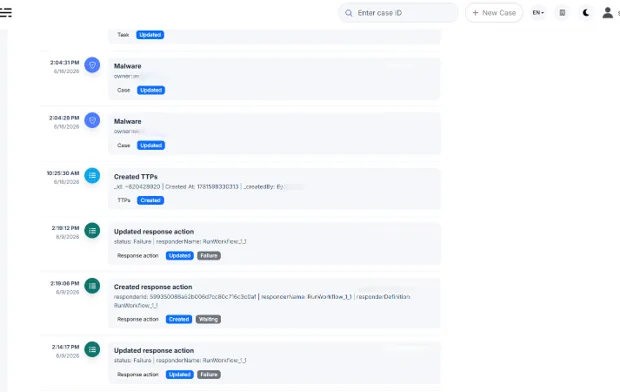
Different types of events on the timeline – case owner change, TTP creation, response actions (Energy SOAR demo)
Summary
The Timeline tab presents the full context of actions taken during incident handling. Instead of sifting through scattered logs and system changes, the user gets an organized timeline showing who performed which action and when. This dramatically simplifies incident analysis, increases SOC team transparency, and supports the auditability of the entire response process.
Timeline is one of those features that may not make headlines in marketing materials, but saves the SOC team time and stress every day. Its value becomes especially clear when you need to quickly reconstruct the course of an incident for a report, an audit, or a conversation with a client.
